
We are excited today to officially announce our third premium WordPress plugin, Novashare! It’s a simple, fast, and lightweight social sharing plugin developed from the ground up with a performance-focused approach to increase your shares.
Just like with our other plugins, our goal is to build plugins that solve problems. You can literally be up and running with Novashare in a matter of minutes and rest easy knowing it won’t bring your site to a crawl.
I’ll take you on a deep dive into Novashare below and explain why we made it and how it can help your site.
The story behind Novashare
Brands, small businesses, and bloggers recognize the need for social engagement as part of their online marketing strategies. That’s why you find social media share buttons on almost all online platforms; apps, mobile games, blogs, ecommerce sites, and more.
The story of Novashare actually starts back in December of 2018. At the time, I had gone through probably my eighth social sharing plugin. While things worked OK, I was just never completely satisfied with the results. Some plugins did certain things amazing while missing the bar entirely on others. I was tired of shuffling through cluttered UIs and having to worry that the social share counts might be slowing down my site.
To be honest, after using amazing products like GeneratePress, my expectations for WordPress products, in general, have risen quite a bit. This is a good thing though, as it raises the bar for all developers. And this, in turn, benefits users and the WordPress ecosystem as a whole.
Quality-driven WordPress plugins and themes help raise the bar for all developers. And this, in turn, benefits users and the WordPress ecosystem as a whole. 👍Click to PostSo in 2018, my brother and I decided to start our own social media sharing plugin. We are never great at picking names. The name Novashare is a spin-off of Novacom. This is a fictional broadcasting company in Adventures in Odyssey, a Christian radio drama that we both grew up on as kids. If you are pouring hundreds or even thousands of hours into something, it’s important to also have some fun with it.
At the time, we were both already swamped with our other plugins and both working full-time jobs. So we actually just sat on the idea, name, and domain for a couple of years. Come 2020, we both decided to finally pursue our projects and plugins full-time.
We immediately started working on the development of Novashare as we knew it was going to take a lot of work. To the user, a social sharing plugin looks pretty simple, but there are a lot of moving parts.
Three months and hundreds of Slack calls later, 😅 we finally had a working version and started running it on all of our own sites. This allowed us to be guinea pigs and make the improvements and fixes that we needed before releasing it on May 4, 2020.
I’m really excited about our finished product and I hope all of you will be as well. We didn’t plan on releasing it in the middle of a pandemic, but we aren’t going to let that stop us.
Novashare features
Below I’ll dive into some of the most important features in Novashare and those I think you’ll probably be most interested in.
Share buttons and counts
Increase your social visibility by adding share buttons on your site’s most popular content. This includes blog posts, pages, custom post types, etc.
Share counts aren’t for everyone and to be honest, they have become less important over the years as networks deprecate their APIs. But we still wanted to deliver both options. So you encourage people to share by showing single or total share counts. Don’t want share counts? No problem, turn them off and you are left with fast static share buttons.

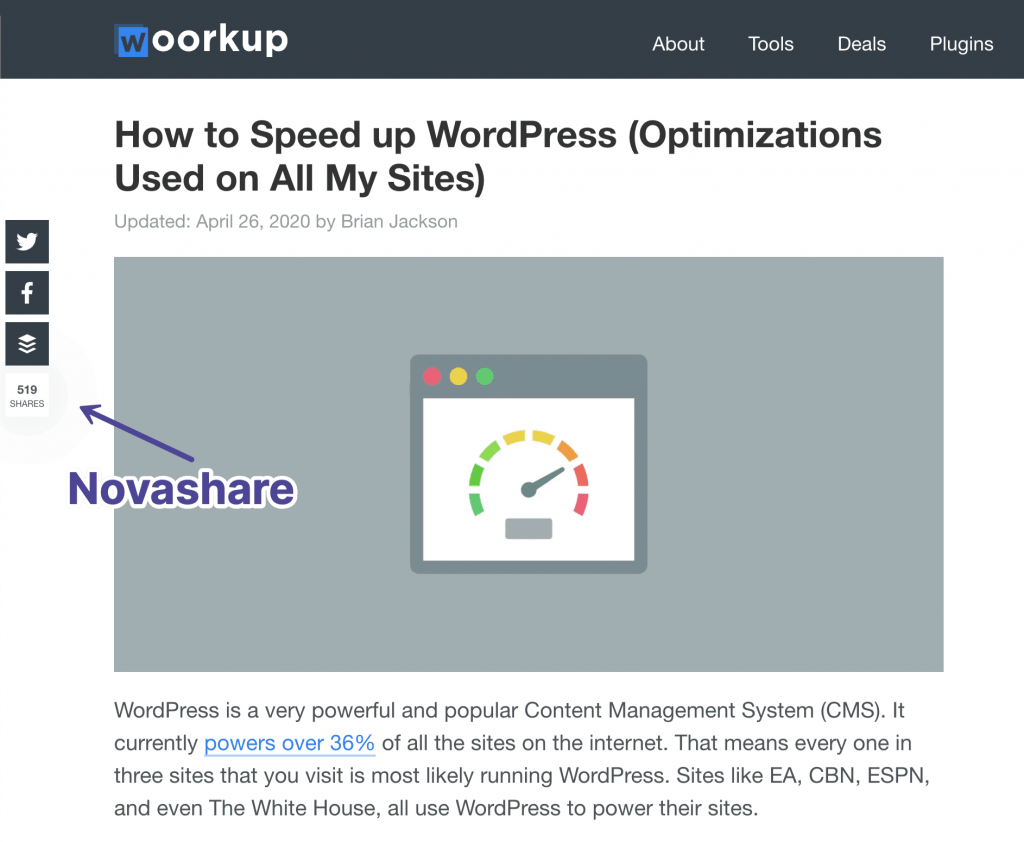
We are running Novashare on all of our sites, including woorkup. If you are on a desktop, you can see our floating share bar on the left-hand side of the screen. If you are on mobile, we have inline share buttons enabled at the bottom of our content.
Novashare includes share buttons for the following networks:
- Twitter (share count support)
- Facebook (share count support)
- Pinterest (share count support)
- Buffer (share count support)
- Reddit (share count support)
- Hacker News
- SMS (mobile)
- Messenger (mobile)
- LINE (mobile)
- Whatsapp (mobile)
- Tumblr (share count support)
- VK (share count support)
- Telegram
- Mix
- Yummly (share count support)
Lightweight and blazing fast
With Novashare, our scripts don’t run where they shouldn’t. This was a big pet peeve of ours with other social sharing plugins. In fact, that is one of the reasons why we developed our Perfmatters plugin in the first place. Regardless, if you don’t have it selected to load on the homepage, then it shouldn’t load there.
Third-party icons are great, but they also come with a performance cost. Novashare instead uses inline SVG icons. This means there are no additional libraries or DNS lookups needed just for the icons. Yay!
We have three share count refresh rate options you can choose from based on the post/page modified date. These use a staggered approach, which is the best for performance and marketing purposes. It keeps API calls down while still focusing on your fresh content.
If you’re a developer, you can also use the built-in filter to pass in your own share count refresh rates. This gives you an unlimited amount of possibilities. Don’t care about share counts? No API calls are made if they aren’t enabled.
Anyone who has done any database or performance optimization knows how troublesome the wp_options table can be over time. It can kill your site’s performance if you aren’t careful. Therefore, we use custom tables designed for scaling of large and high-traffic WordPress sites. The bulk of the data is stored separately.
Just how lightweight is Novashare? It’s under 5 KB on the front-end! In other words, our plugin is tiny.

Check out the load time on our demo site.

Easy UI
A lot of plugins have their own fancy control panels. We love great design, but when it comes to functionality on the back-end, it usually means you have to waste time learning a new UI. We go a different route with not just Novashare, but all of our plugins.
We take advantage of native WordPress styling. This makes it fast and easy to jump right in and start configuring settings.
- Enable inline share buttons, floating, or both.
- Choose where to display icons (posts, pages, blog feed, archives, and custom post types). We also have a shortcode you can use. So you can literally put the share buttons anywhere you want!
- Pick from 17+ different networks.
- Change the size, shape, and color. Match the branding of your site in seconds.
- Display social share counts: individual, totals, or both.
- Set breakpoints where you want the share buttons to appear on mobile.

Scales across all devices
Novashare is responsive and works on all devices, from desktops to mobile phones. Set breakpoints above and below where you want to hide your share buttons.
You can configure any type of scenario:
- Show floating share buttons on desktop but only inline button on mobile (top or bottom of content or both).
- Show floating share buttons on desktop that scale down to floating share buttons on mobile (stick to the bottom of the screen).
- Show only inline buttons on desktop (top or bottom of content or both).
- Show only inline buttons on mobile (top or bottom of content or both).
- Show only floating share buttons on desktop.
- Show only floating buttons on mobile.

Match your branding
Every site is different and you should have options. Novashare lets you match your WordPress site’s branding with just a few simple clicks.
There are dozens of styles, shapes, and size combinations you can use. You want your buttons to stand out, but not necessarily clash. Below are just a few of the many combinations.


Choose any colors you want. Below is an example of Novashare on woorkup staying inline with the site’s color scheme.
Click to Tweet block
Over the past year, we have fallen in love with the block editor and now use it for everything. It’s the future of WordPress! In fact, the entire Novashare website is built using blocks.
Novashare comes with a Click to Tweet block you can easily add to any post by clicking “Add block” in the editor.
Hey look, I’m a blue tweet box. Please tweet me. 🙏Click to PostIf shortcuts are more your thing, you can quickly insert the block by typing /nova… (See it live!)
The block features the following:
- Choose between three color themes
- Change the default CTA
- Change the CTA position
- Remove the URL or the username.
- Option to hide hashtags.
Still using the Classic Editor? We also have a customizable shortcode you can use.

Follow widget
Novashare also has a follow widget that lets your users quickly connect with you on your favorite social media networks. Add it to your site’s sidebar or footer. The widget features the following:
- 57 buttons and networks.
- Easy drag and drop interface.
- Customizer support for making changes with live preview.
- Three different shapes: Squared (default), rounded, and circular.
- Three different alignments: Left (default), right, and center.
- Change the size of the buttons.
- Change the button and icon colors, as well as the hover attributes.
- Option to open links in a new tab.

Analytics and link shortening
We believe in keeping things simple but still giving you the data you need as a busy site owner or marketer. Some of these features include:
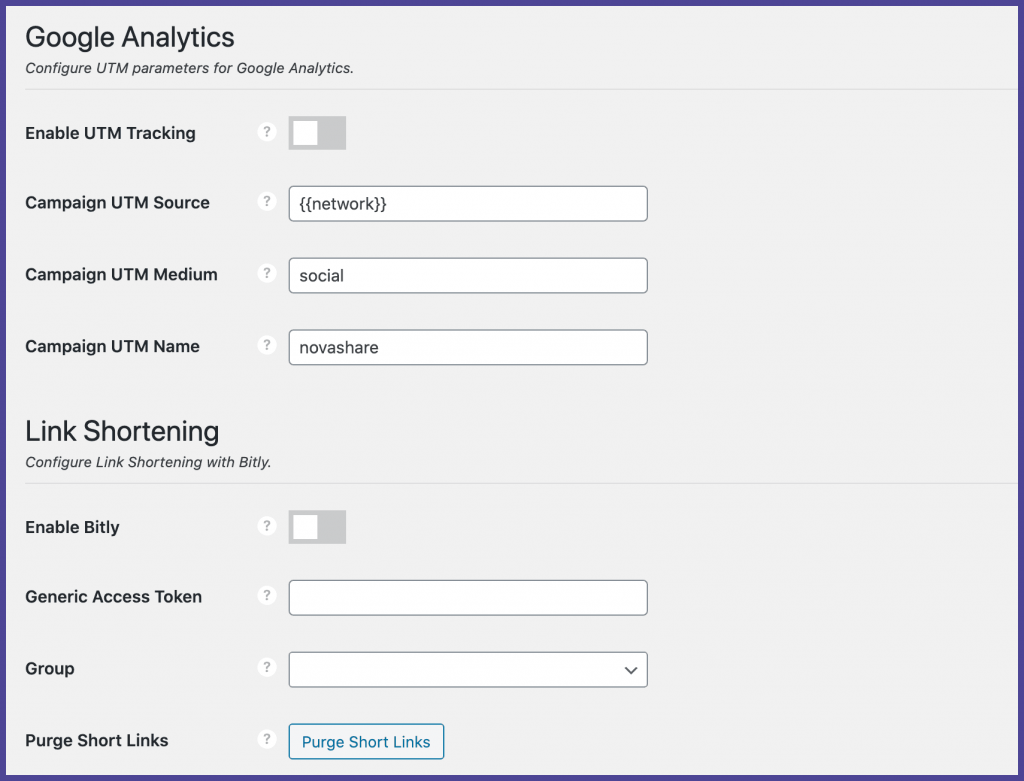
- Enable and configure UTM parameters so you can track which social networks are driving the most traffic to your site.
- Short and not distracting URLs by enabling link shortening with Bitly.
- Analyze your link click data in Bitly’s dashboard.
Other misc. features
Below are some more features that are in the Novashare plugin.
Share count recovery
Novashare has a share count recovery feature. This lets you automatically recover all of your previous social share counts that might have been lost during:
- HTTP to HTTPS migrations
- Domain changes
- Changes to permalink structure (common or custom)
- URL changes (includes an editor option to add previous URLs on any post)
Pinterest image hover pins
Novashare has Pinterest image hover pins. This enables your visitors to selectively pin any image from your site to Pinterest as they are scrolling through your content. This feature is done entirely with inline CSS on the front-end with no additional JavaScript.

You can also upload separate hidden images optimized for Pinterest that are pinned instead of the image in the post.
Support from the developers
There is nothing worse than subpar support. That is why we will never outsource this. With Novashare, you get help directly from us, the developers of the plugin. We have over 19 years of experience working with WordPress on a daily basis.
Developing plugins isn’t just a side hobby for us; it’s what we do full-time. We are continuously releasing new features and fixing bugs. We utilize our own plugins on every site we use. This is the perfect scenario for everyone, because like you, we also want new features!
Your feedback is also very important to us. If you have an idea or suggestion, we would love to hear it. Make sure to check out our current feature requests and the changelog for Novashare.
Pricing
Quality-driven WordPress plugins take a lot of time to develop and support. It’s also important to us that we continually add new features and improvements going forward based on user feedback, and those that align with our focus on performance. That’s how we determine our pricing.
You can choose a license that best suits you:
- $24.95 for 1 site license. Includes 1 year of support and updates.
- $54.95 for 3 site license. Includes 1 year of support and updates.
- $124.95 for an unlimited site license. Includes 1 year of support and updates. This also supports multisite.
And yes, the plugin comes with a 30-day money-back guarantee. For a limited time though, use our coupon code WOORKUP for 15% off!
Kind words from a happy customer.

Scott Hartley
Founder, SERT Media
I don’t commonly pick up and purchase a premium plugin as quickly as I did Novashare. This plugin is not only lightweight, it also offers a rich feature set for about 1/4 the weight of Social Warfare. While it’s not a large difference, if you were still using ShareThis or AddThis, or AddToAny, this plugin will be faster. I am currently swapping all of my sites over to it and some of my maintenance clients who could stand to see some additional improvement. – SERT Media
Summary
We hope you enjoy the Novashare plugin as much as we do. If you have any questions about the plugin, feel free to drop them in the comments below. Or for a faster response, send us a message via our contact page.
If you are already enjoying Novashare, a friendly reminder that our affiliate program is up and running. Happy sharing!
